Toolmemo

MAC / PRACTICAL NOTE

How to uninstall apps on Mac—and what to check if one will not delete

Quit the app, move the correct item to the Trash, and know how to undo the move.

Checked October 24, 2026 · macOS 26.5.2 · English interface

Quit the app, select it in Finder → Applications , then choose Move to Trash . If the developer supplies an uninstaller, check its instructions first.

For a reversible demonstration, we used an app copy named Toolmemo Practice in a practice folder. Your installed app will normally be in Applications. This does not demonstrate uninstalling the protected system Calculator app.

Orange solid: actionBlue dashed: result

01. Quit the app first

Use Command + Q after saving any open work. If the app will not respond, review the force quit guide before continuing.

02. Select the correct app in Finder

Open Applications in Finder and check the app name. The screenshot uses the practice copy. Do not substitute a document or project folder for the app itself.

Full window · Highlights
The actual Finder window with the practice app copy selected. This demonstration uses a practice folder, not the Applications folder.Full window1
The actual Finder window with the practice app copy selected. This demonstration uses a practice folder, not the Applications folder.

    03. Move the app to the Trash

    Choose File → Move to Trash or press Command + Delete. Your Mac may request an administrator password. The practice copy disappeared from its folder. We did not empty the Trash.
    Full window · Highlights
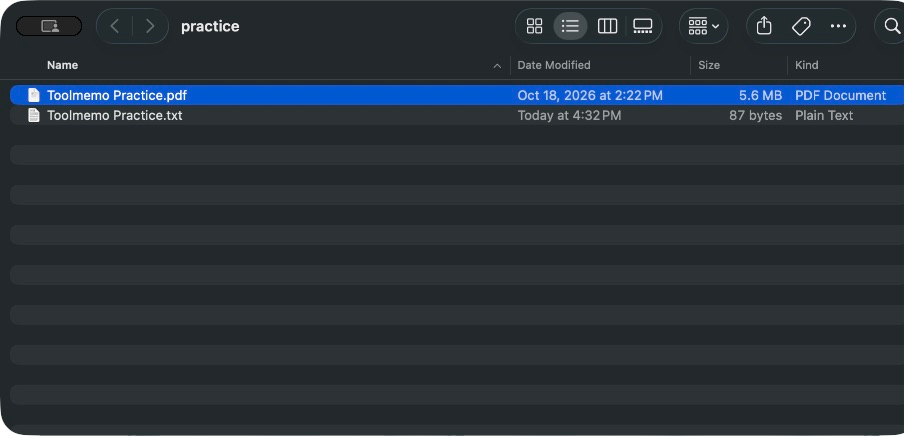
    The same folder after the move: the app copy is absent, while the PDF and text document remain.Full window1
    The same folder after the move: the app copy is absent, while the PDF and text document remain.

      04. Undo an accidental move

      Before doing other file operations, check Edit → Undo Move in Finder. We restored the practice copy this way. This is not a recovery method for items after the Trash has been emptied.

      Full window · Highlights
      The practice copy is back after Finder’s Undo Move command.Full window1
      The practice copy is back after Finder’s Undo Move command.

        If the app cannot be deleted

        An “in use” message can mean the app is still running. Some apps required by macOS cannot be removed. Do not disable system protections or delete unfamiliar support files to force removal. Removing an app does not cancel its subscription or necessarily remove documents and separately stored data.

        What we verified

        Only the practice copy was moved to the Trash and restored. The original system app, personal documents, and other Trash items were left alone.

        Official references